

Introducing how to use the AccHelper tool
Hello, like the previous article, I instruct how to use the vnTools tool to change numbers into words in excel quite quickly and easily, but the downside of the vnTools tool is that it can only be used well on 32 bit versions of Excel, for with 64-bit versions of Excel 2010, 2013, and 2016, the tool often reports errors and fails to run. Today I introduce and guide to support accountants and office workers with another tool to change numbers into words, which is the AccHelper tool developed by bluesofts company. The advantage of this tool is that it runs quickly and installs easily, and it runs both on 32-bit and 64-bit Microsoft Excel.
Before installing, you should pay attention to turn off all Excel files on the computer.
Download the AccHelper installation package for your computer
Download the latest Acchelper installation package here and unzip
After downloading the AccHelper tool, follow the link above, go to the downloaded file folder ==> right-click on the Acchelper.rar file and select Extract Here to extract the Acchelper folder as instructed in the image below.

Installation instructions on Excel 2007, 2010, 2013 and 2016
(*) Install Add-in in Excel2007, 2010, 2013, 2016 or higher:
+ Clicking on the “File” button (or “Office Button” with word 2016) is a big, round button in the top left corner of the screen.
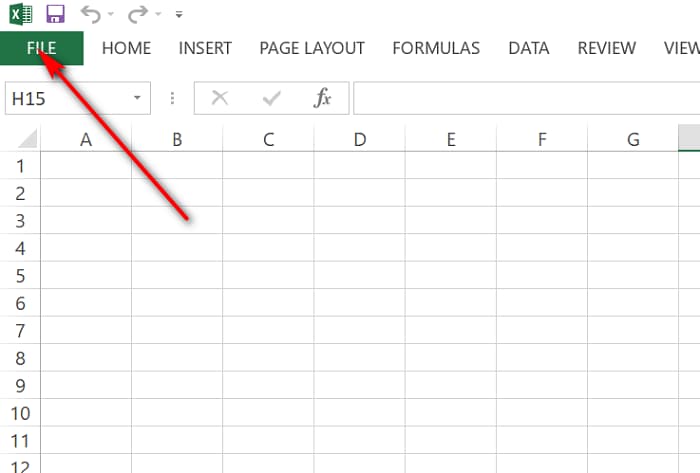
+ Select “Excel Options”

+ Select “Add-Ins”, right side screen, bottom “Manage:” choose “Excel Add-Ins” and finally choose “Go”.

+ At the “Add-Ins” screen, do the same as with Excel2003 and earlier. Click “Browse” and select the file “AccHelper.xll” (This one file is enough).
+ If your Office is 64 bit, please select the file under the path “x64 \ AccHelper.xll”


For example:
= VND (1000) returns the font UNICODE which is default.

Installation instructions on older versions of Excel 2003
(*) Install Add-in in Excel97 / 2000/2002 (XP) / 2003:
+ Go to the Tools menu, choose Add-Ins, “Add” / Add 2 files
+ Select the “Browse” button and select the file “AccHelper.xll”, do the same thing again to install “AccHelperEx.xla” (to read unicode font, or to read numbers over 15 digits.)
For example:
= VND (1000) returns the font TCVN3 (ABC) is default. For any unicode, the formula must be
= VNDW (1000) or
= ToUNC (VND (1000))
(The ToUNC () function converts the font ABC to Unicode)
Fix the error that AccHelper cannot be installed on the computer
(*) If the installation steps above still do not work, please copy the files and paths below:
1. The files to copy:
+ “AccHelper.xll”
+ “x64 \ AccHelper.xll” – If Office is 64-bit.
+ “AccHelperEx.xla” Just if you need to use the function VNDW, USDW to read the numbers over 15 digits.
2. Path to place the copy file (Paste)
(Quick: Open My Computer, paste the following path in the address bar and then Enter)
+ For Windows XP: C: \ Documents and Settings \% username% \ Application Data \ Microsoft \ AddIns
+ For Windows Vista or higher: C: \ Users \% username% \ AppData \ Roaming \ Microsoft \ AddIns
Instructions for customizing readings for AccHelper in Excel
(*) To change the parameters set by default for functions as well as how to read the number of functions, there are two ways:
1. Run the file “AcchelperOptions.exe” to adjust the information on it.
2. Open the file “AccHelper.ini” in the folder containing the add-in file (opened in Notepad or a certain editor), correct the necessary parameters.
(*) To find detailed instructions and examples, open the file “Help.xls”
So I have completed the instructions on how to install and use the AccHelper tool to change numbers into words in Excel.